The ad blocker for both your browser and your computer apps
Ad Guardian Plusis a lightweight security and privacy program that allows you to block online ads with ease. Developed by Bit Guardian GmbH, this ad blocker can run in the background. Unlike most ad blockers, this one isn’t a web browser extension. However, it works on most browsers and can block various types of ads and malware trying to sneak in from URLs.
Top Recommended Alternative

Flexible in blocking
Ad Guardian Plus is a native Windows ad blocker, meaning that it’s a downloadable program for you to install on your computer. There’s no browser extension necessary for it since it also scans your computer applications for any ads displayed on them, like pop-ups of promos from your antivirus programs. With this, you can completely avoid advertisements on any application.
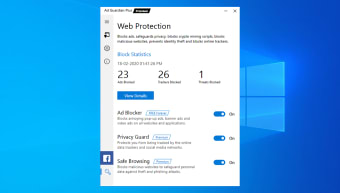
The ad blocker’s interface is straightforward and easy to use. After installing, it will give a brief tutorial about its features. Your main menu is the Web Protection section, which quickly shows the block statistics like the number of ads, trackers, and threats blocked. If you want more information on the statistics and the blocking history, you can select View Details.
Underneath, you’ll find three major features you can toggle on and off. Ad Blocker lets you completely block all types of ads, from common ads such as pop-ups and banners to advanced ones like Facebook and YouTube ads. Privacy Guard protects you from online data trackers and social media networks. Safe Browsing blocks malicious websites aiming for data theft and phishing.
Easy controls with customization
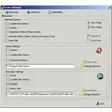
For the settings, you’ll find both general options—like notifications and languages—and in-depth configuration—choosing which types of ads to block and which applications to block them from. Blocking crypto-mining scripts is also a feature toggleable in the settings.
When you’re browsing online, you can find a green hand symbol on the bottom-right corner of your screen. This is your Web Assistant, which gives you quick stats on Ad Guardian Plus’ activities online, shows you Ad Blocker and its toggle option, and allows you to personally block ads via web page elements. Lastly, there’s the Help & Support section, which provides the FAQ, tutorial, support request, feedback, and product information.
Choose the perfect plan
Ad Guardian Plus has 1 basic free plan and 3 paid plans. The basic free plan has the Ad Blocker function as a completely free feature, while Privacy Guard and Safe Browsing are available for a 7-day trial. This is great since Ad Guardian Plus’ ad-blocking also makes webpages load faster and protects the users from malicious attacks via malvertising.
In-depth security against ads
When it comes to intensive ad-blocking that offers extra security to your online activities, this ad blocker is a good choice. It has tons of features that are easy to enable and disable, it allows you to extensively configure your preferences, and it blocks any type of ad, letting your browser process your input much faster.












.png)